Thursday, 6 February 2014

Escape Studios: Weeks 3 & 4


Well hello there!

Yeah, turns out this intensive-course thing can be pretty draining! My lateness is somewhat to do with my internet/laptop playing mind games with me. So I shall be combining two weeks into one blog post. Cheeky, I know, but bear with me.

So I was pretty excited about Week 3, as we continued our modelling lessons and began to sculpt a face from scratch. Character modelling is something I'd love to get into, and whilst there are more catered packages like Zbrush or Mudbox (which we'll be working with a little later on) for detailed sculpting, I think Maya can be really good for getting your basic mesh down!


I am aware how creepy it looks in progress but hey! We started off with the polygons around the eye, and built out from there. We used a reference, and in the end I think he (sortof) looked a little like the guy in the pictures. I think what I enjoyed the most was using the sculpting tools, as it felt like a more organic way of modelling. I think this means I'll be loving mudbox whenever we get to it!


Later on in the week, and into the fourth, we started to learn UV Mapping. This, as it turns out, is one of the most tedious processes in 3D. My understanding of this is: your UVs communicate to the software how your texture should be dispersed across the model, and so they need to match up proportionately with the size of your polygons (not going to lie, was pretty difficult to get my head around). This involves unfolding your 3D model into a 2D space. The way we start this off is with a generic numbered checkerboard texture. With this you can see where your texture will stretch (if at all) and distort once you unfold the model:


We set to work on a hand, a head (one the tutor had made) and the plane we'd made earlier in the course. The aim of the game is to get all of your checkers/numbers as equally spaced as possible. This can take hours and hours of poking your UVs, which is not the most thrilling job in the world but still very important!


Finally, towards the end of Week 4, we concentrated mainly on learning the beginnings of lighting rigs, and working on our projects the other 50% of the time. I think of all the things so far lighting is one of the parts I am struggling with. I'm currently in week 5 and trying to set up a basic rig for my Gameboy, and I'm finding it pretty challenging. Unless you're pretty adept at this, its essentially a game of trial and error until your lights seem to give off the right highlights/shadows. (aka stress central). Here is a basic lighting rig we did based on a sunset environment:


As for my project, it's getting there. I feel a lot more confident with Maya's interface, and I'm even starting to use the hotkeys/menusets without thinking...like some sort of weird muscle memory. I think it's crazy that 4 weeks ago I had no idea what was going on, and now I'm only a week away (in theory) from having individually modelled, textured, lit and rendered a full photorealistic scene! The deadline is in a week and so I'm not going to lie and say I'm at all relaxed. Here are some screenshots of my model in progress, but I will probably update in a couple of weeks with a more indepth shot-by-shot (and hopefully final piece)!


I can't promise a week 5 this weekend, but I will do my best! If not, I will have a lot more free time after this first project, so I'm hoping to dedicate a bit more time to blogging then.
If you've made it this far, thanks for reading!

Annie
xxx


Saturday, 18 January 2014

Escape Studios: Week 2


Hello again!

So this weekend I'm pretty tired, I think I'm still adjusting to the early mornings and daily commute (and being squished between lots of miserable commuters every morning) I'm moving to London asap as it is much less expensive and almost halves my journey time :)

In the meantime, though, I'm still very much enjoying the course, though the stress has begun to creep in, as at the beginning of this week we chose items for our upcoming project. I have gone with a gameboy color, as I had an old (amazingly still functional) one at home! It may not look like the world's most complicated object, but take a look at the sides/back and you realise there's a lot more detail than you think!


We basically have to create it from scratch, model it to scale, and then texture/light/render it in a scene so it looks as photorealistic as possible. Not asking much, then, right? I'm not going to lie, I'm a bit nervous about this, but after seeing some other projects from past students (who like me started out as beginners), it 
was encouraging to see how much progress they made in such a short space of time!

This is where I am currently. I've been playing around with different modelling methods, including NURBS curves and polygonal modelling. Think i prefer polys but we'll see which works better! We were warned we'd probably have re-model about 5-6 times at the beginning to decide on the best method, but I'm running with this for now!


In other news this week, we finished off our brief training in NURBs modelling (as it is used much less frequently) and started to model in polygons. Immediately I found it a lot easier to get my head around!

As our classes are separated into 50% tutorial, 50% individual work time, we also learnt more about modelling in polygons and toggling between smoothing options to get an attractive result. This week involved a Mustang plane:


And a tractor tyre:


We learnt a lot of different techniques this week, including linear modelling, and non-linear modelling - which means rather than working into one surface, and adding detail afterwards, you work up from a flat plane (e.g, upper screenshot) and then once you have the details where you want them, you add deformers/rotations in order to get the desired result! I can't wait to be at a stage where I can just glance at an object and immediately know which methods to use - at the moment there seems so many different options its difficult to start anything!

I'm pretty far off dragons haha, but I think I need to master real objects first before I can think about anything remotely fantastical :)

Thank you for reading, and I'll be updating again next weekend!

Annie
x

Wednesday, 15 January 2014

Escape Studios: Week 1 (Continued)

Might have to cut down on the amount of screenshots I take haha.

This is just a quick one to show the culmination of all of our models from last week:


Had a lot of fun playing around with lighting tints. I like to think this could be some sort of Assassin's Creed-y/Pirates of the Carribean scene. Obviously we didn't get a choice with what we were modelling but I enjoyed the level of creativity we got when making up our scenes. Obviously the barrel positioning is way off haha. The lower screenshot is a preview of the final render (in mental ray). We didn't actually go ahead and render anything as it was just a practice (and it probably would've taken an age...)

Another update coming your way friday, covering this week's progress!

Annie
xx

Saturday, 11 January 2014

Escape Studios: Week One


So this is a day late, but in my (poor) defence I went out for a couple of drinks with my coursemates after Friday's lesson and collapsed into bed when i got back, which looks like it might turn into a weekly thing so we can all blow off some steam! In light of this, I hereby christen Saturday as blogging day :)

So it's a tad overwhelming that this has happened so quickly, I made the decision to consider VFX as a viable career option about six months ago, and here I am now on an 18-week journey to becoming a 3D artist! We dived straight into Maya on our first day, and though there is certainly a creative/arty aspect to creating models, there's also a hell of a lot 
of technical knowledge that you need to learn before you can start to visualize what's in your head. I think the promising thing is that I don't feel put off by this at all, it's more a motivation to learn the software so I can play around to my heart's content (and make shitloads of dragons).

This week we've been covering the Maya interface, using several of the tools, and going through explanations of what they do and why they do it. With Maya, there's at least two or three different ways to achieve the same effect, and the challenge is a) learning how to use them and b) knowing when to use what.

In our first tutorials, we began to model using NURBs, and creating basic shapes, then learning to manipulate them using the vertices/faces/edges and a number of tools.


This involved learning how to draw EP/UV curves, the Revolve and Extrude tools to name a few. The thing I like about the course is that though our tutor provides us with a model example on the projector, even after a few lessons I was starting to make mine more individual, and I could be creative even after a few hours. Don't get me wrong, I made a whole lot of mistakes and if you don't listen you do end up missing about five steps in about a minute, so I probably annoyed my neighbours quite a lot...The majority of my class already have a fair knowledge of this software, so I'm going to have to work pretty hard to keep up!

In the second half of the week, we moved onto texturing and rendering. I think I enjoyed the texturing process a lot more than the modelling process, as once you've gotten to grips with how each node is connected, you can start to play around with colour/light values which is a lot closer to how I use Photoshop! I think this will help once me move into creating and sourcing our own textures, as at least I can navigate a little better around the software. I'd say I was most pleased with my apple (as dorky as that sounds) because I went a bit off piece from the tutorial (oops) but ended up with quite a nice product:


Finally, we created a scene from the objects we'd been putting together, lit it, and rendered it. Learning about lights was fairly confusing, but I was quite pleased with the end product. Sadly I forgot to screenshot this before I left, but I'll update this entry once I can get my hands on them!

I'm not going to lie, it's pretty overwhelming if you're an absolute beginner, and though I took on a lot I've still got a hell of a lot to practice. Hopefully I'll have a new laptop soon which will mean I can use the software at home and improve my understanding of it in my own time. Either way, I refuse to be scared off, and as we're beginning our first official project next week, I'm going to try and commit to practicing as much as possible. This might mean a few (lots of) late nights, but hopefully the end result will be worth it! They have a free coffee machine, I'm pretty sure I'll manage.

I'll post again soon with my final scene from last week as well as some updates from next week soon. Currently deciding on what to do for my first project, decisions are hard!

Annie

xx

Saturday, 4 January 2014

My Resolutions 2014


As cliche and probably overoptimistic as it is, I like to set myself goals at New Years. I think to write it all down on a blog too is a good way to force yourself into keeping them, so you can track my progress and/or failure!

Even though nothing has really changed other than the fact that we have to remember to write a different group of numbers in the date box, and we're not fitting into our pre-christmas trousers as easily, it does feel like a reason to push for change.

So, here goes:

  • Improve my diet. I've been trying to do this for years. Also with some recent illness I was recommended to change my diet by my GP, and i'm also horribly anaemic, so I sortof have to do it anyway.
  • Get into a regular exercise routine. Again, it's a classic one, but I think now is the time I need to make a lifestyle change. I'm heading into a career area which is mostly sedentary, so if I don't change things up soon I'll be weighing in several stone heavier in a few years! It's not really a weight thing, but it'd be nice to feel light and healthy for a change.
  • Create something every day. Even if this just means a scribble on a piece of paper or a photograph, I feel like in order to keep my motivation up creatively I need to push through and make it part of my new routine.
  • Read more blogs and interact with the community. After talking to a friend recently about finding new blogs and things to read about, I realised that actually, I don't do it enough. I'm subscribed to several blogs, but I've kept with the same ones for the past year or so now, and so I need to push myself to explore a little. I might try and do some sort of feature every month or couple of months on new people I've found. 
  • Get better at staying in contact. I'm so bad with my phone. Really bad. I'll read a text, even go as far as thinking about what I'm going to reply, and then still manage to get distracted somewhere along the line, or leave it in another room. I have so many very good friends, and as everyone is at such a pivotal moment in their lives right now, either starting careers or taking the next step, it can really test a relationship!
Wish me luck!

I'm starting my course on Monday (see previous post for details) which I'm sure I'll be blogging about as much as possible :) If you have any new years resolutions, or would like to link to your blog, just comment below!

Annie
x

Saturday, 28 December 2013

Laptop Breakdown, Christmas and the Future!

Hello all!

So basically this is going to be one of those very convoluted blog posts that I don't expect anyone will read, but if any of you want to know things about where I am currently, then this will provide all of the info necessary!

First of all, I'd like to say a very big Merry Christmas and Happy New Year to everyone!

The reason I've not been posting as often is due to a laptop crisis of sorts...in that it likes to randomly bluescreen/crashdump whenever it feels like it, and has been officially declared null, void etc. by a computer man in a shop (who i paid quite a lot of money just to confirm that for me, ffs.) Basically if I even remotely try to open Photoshop, plug in hardware, or open more than about three tabs, it freaks out and bluescreens. Which has put a stopper to any digital creativity this Christmas!

The good news is that I'm currently researching new laptops, which will be fun and exciting as it has been four years since I bought myself any new gadgets!

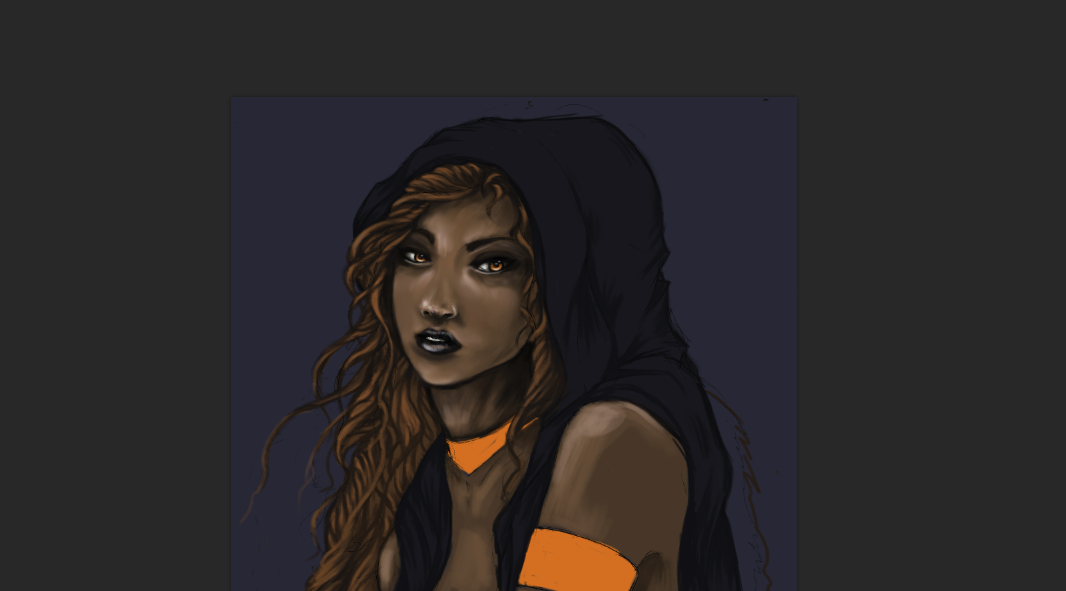
The furthest I got before it died was an unfinished 4 hour digital painting which I will share with you briefly!:


I'm very glad I managed to recover it (thankyou autosave) as it all looked pretty grim for a bit. I'll hopefully be back in business soon!

As for the imminent future, the next big piece of  news is that I have officially signed up for the Advanced 3D for VFX course at Escape Studios. Following on from the Taster course I wrote about a couple of months ago, I decided to bite the bullet and go ahead with it. The course is 18-weeks, very intensive but hopefully by the end of it I can officially call myself a 3D Artist which will be very exciting! More on that soon, fingers crossed!

Finally, I had a lovely quiet Christmas with my family, and received lots of lovely prezzies (mainly Game of Thrones themed) for which I feel very lucky that I have such generous family and friends! All of my gifts went down well too. I might post separately about this if I get the time :) I can't wait for New Years Eve, where I plan to get very very intoxicated before I have to start burying my head in education again.

Anyhoo, that's all from me, hopefully the next time I write will be from a brand new, fully functional laptop!

Annie

xx

Tuesday, 3 December 2013

Sketch Post

Just  a quick one before I go to bed!


I'm going to try and start painting her in soon, I'll keep you updated on my progress!

Annie

xxx